
Every task that needs a person, in one inbox
CKN Portal is the layer your people actually work in: one work inbox, notifications, assignment, escalation and approvals in one place. Work from any service lands in a single queue, while the service that raised it stays the authority on its status.
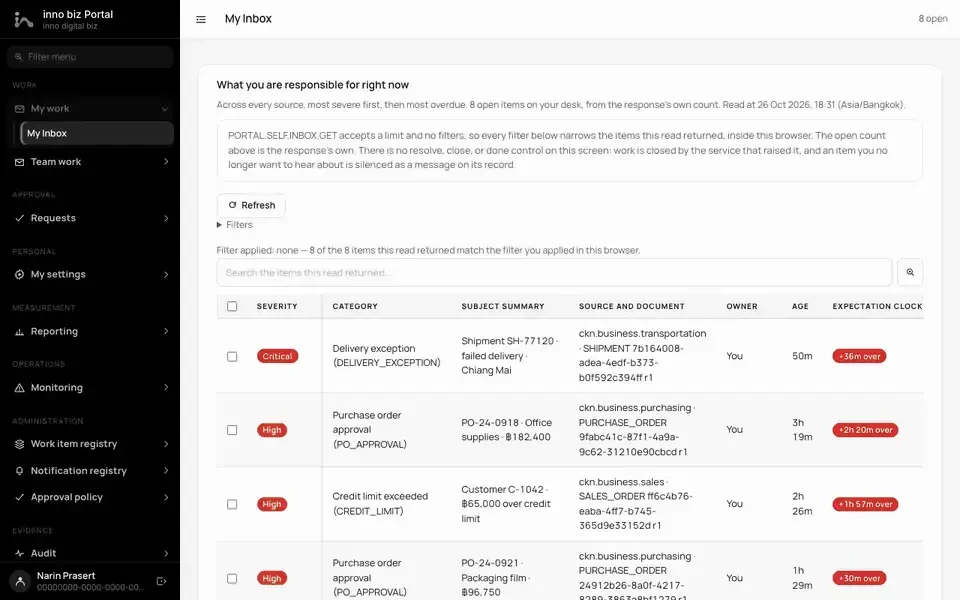
My work, most urgent first
Work from every system lands in one inbox, with its severity and the time left.
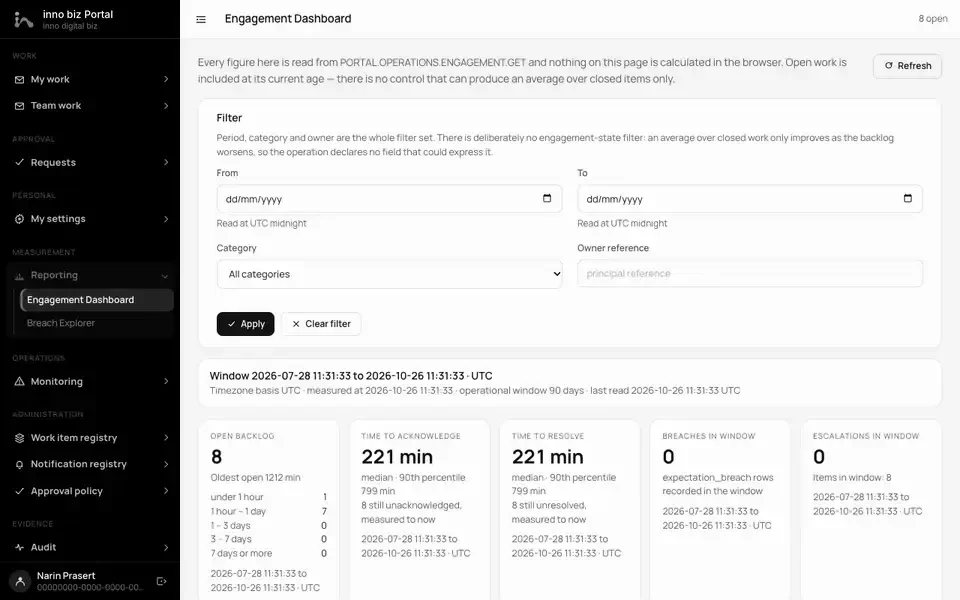
Measure how the team responds
Open backlog, time to acknowledge, time to resolve and escalations for the window you pick.
What CKN Portal does
One work inbox for the whole company
Work that needs a person, from every service, is gathered into one queue. Each item shows where it came from, how urgent it is and how much time is left.
- Ingest through one API call; a retry never creates a duplicate
- Categories carry default severity and acknowledge/resolve time targets
- Items whose source has gone quiet too long show as stale, never as current
- Separate personal and team inbox screens
Acknowledge, assign and watch
Acknowledgement, ownership and watching are independent facts, and Portal records them that way instead of forcing one status string.
- Each person's acknowledgement is recorded once
- One open owner at a time, with a reason on every reassignment
- Watchers are notified but never escalated to
- Anyone can mute an item's notifications while the work stays open
Escalation that never goes silent
Set one limit for how long an item may wait unacknowledged and another for how long it may stay unresolved. When a limit passes, the item is re-routed to the policy's target role.
- A sweep that runs twice produces one escalation, one reassignment and one notification
- Capped sequence; reaching the cap records a breach instead of closing the item
- A target role with nobody in it raises a visible routing exception
- Escalation never approves or resolves anything on its own
Multi-channel notifications
Templates, subscription rules and channels are set per work category and per recipient language. Each person ranks channels and sets their own quiet hours.
- IN_APP, EMAIL, SMS, PUSH and WEBHOOK, with templates per channel and locale
- Quiet hours and digests in the user's timezone; CRITICAL items are never delayed or batched
- A digest lists every item individually, not just a count
- Every delivery attempt and its outcome is recorded as evidence
Multi-step approval workflows
Approval policies are versioned revisions with ordered steps, each naming the authority it needs. Opening a request freezes the active revision, so the rules cannot change mid-flight.
- SERIAL or PARALLEL step order, as the policy declares
- Separation of duties: requesters cannot approve their own request, and delegation does not bypass it
- Approvers without the required authority are refused with a code naming the missing authority
- An expired request is never an approval and keeps every earlier decision
Evidence, measurement and control
Every action leaves an audit trail, and operations teams can see whether the organisation is responding to work the way it expects.
- Audit timeline, engagement dashboard and breach explorer
- Scheduled expectation checks that record every miss
- Tenant isolation, backed by dedicated tests
- Scheduled retention purge
Built and tested at this scale
These figures describe what is built and the specified defaults. They are not speed measurements or production usage numbers.
Figures come from CKN's own test suites and benchmarks. Real results depend on each system's hardware and data volume.
What your business gets
Fewer items lost to silence
An unacknowledged item moves to the next person under your policy, and if it cannot be routed the system shows an exception instead of staying quiet. Critical work is much less likely to sit unseen.
Less coordination overhead
Instead of each system building its own alerts and approval screens, every service uses the same inbox and approval flow. Teams learn it once and you maintain it once.
Control you can audit
Approvals enforce real authority and separation of duties against rules frozen when the request opened, and the owning service always applies the final outcome. Every decision and delivery leaves evidence you can review.
Example: raise a work item into the inbox
Who relies on it
- Business services that need a person to decide
- Integration, which calls Portal on behalf of users and triggers its scheduled workers
- Identity, for sign-in and approver authority checks
- Industry Solutions, through Integration entry operations
POST https://portal.example.com/work/work-item/ingest
Authorization: Bearer <service-token>
X-CKN-Delegated-Context: <signed-delegation>
X-CKN-Tenant-Id: <tenant-id>
X-CKN-Operation-Code: PORTAL.WORK.WORK_ITEM.INGEST
Idempotency-Key: <unique-key>
Content-Type: application/json

{ "sourceService": "<source-service>", "sourceDocumentType": "<document-type>",
  "sourceDocumentId": "<document-uuid>", "sourceDocumentRevision": 1,
  "raisedAt": "2026-08-16T03:00:00.000Z",
  "subjectSummary": "Invoice INV-1 failed three-way match" }

201 { "success": true, "data": { "workItemNo": "WI-2026-000001",
  "status": "OPEN", "severity": "HIGH" }, "replayed": false }