
One UI codebase, real iOS and Android apps
CKN UI Native draws the screens you already wrote with CKN UI for the web as real native views on iOS and Android, with no second codebase. One team maintains web and mobile, so features ship on every channel at the same time and at lower cost.
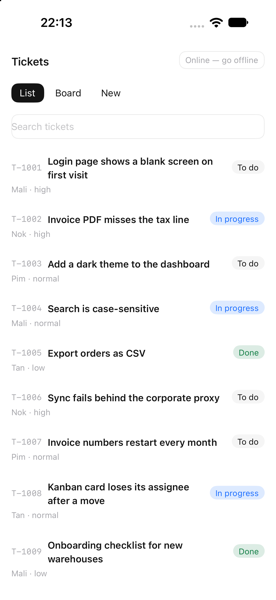
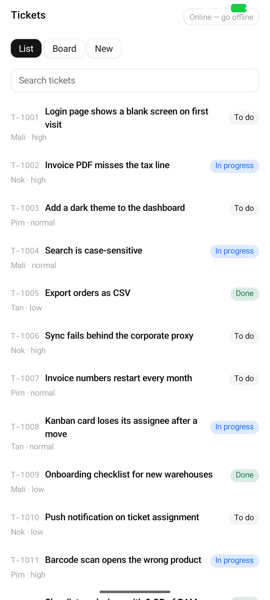
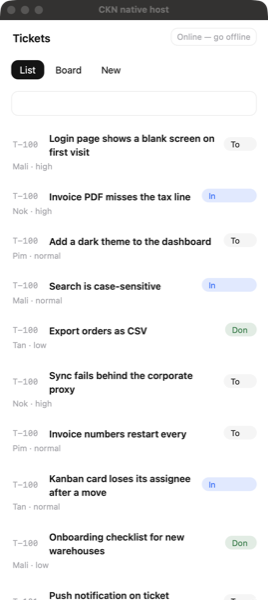
The list screen, on three platforms
One screen definition, drawn as real iOS, Android and macOS views.
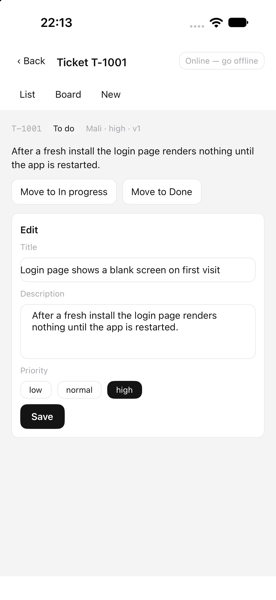
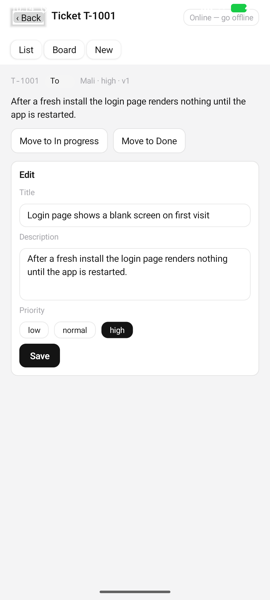
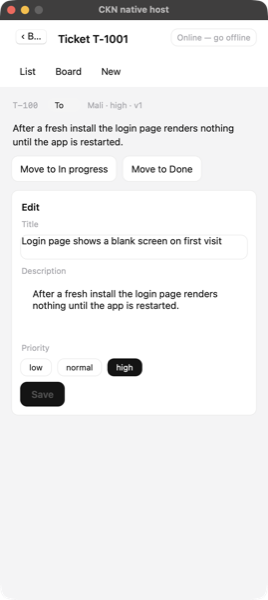
The edit form, with offline mode
Fields, buttons and choices use each system's own controls, and keep working without a network.
What CKN UI Native does
One screen, web and mobile
Your existing CKN UI components and templates render directly as iOS and Android views. Screens contain no platform-specific code; only the app's one entry file knows it is running natively.
- Runs the same component classes as the web
- Same declarative templates, no new language
- A build-time check flags anything that cannot run natively
Uses the OS's own engine
The app and its components run in JavaScriptCore on Apple platforms and in the system WebView engine, headless, on Android. No third-party JavaScript runtime is bundled.
- No Swift package, CocoaPod or Gradle library added
- Targets iOS 17+ and Android 10+
- Ships the runtime basics: timers, fetch, WebSocket, URL, crypto
CKN's own layout engine
CKN UI's flexbox-style layout runs inside the engine. The Swift and Kotlin side only creates views, places them in the frames it receives, and forwards events.
- One batch per frame between engine and platform
- Layout matches Chrome within 1 px in its test suite
- A documented bridge protocol you can audit and extend
Standard components and CKN themes
Components tied to browser APIs, such as modal, select, table, grid and kanban, have native versions registered under the same tag. The innobiz and ckn themes are generated from the platform's shared rules, so the look matches the web.
- Overlays become bottom sheets, list sheets and OS pickers
- Data table, grid and kanban (long-press drag)
- innobiz and ckn themes ready to use
Works offline
The offline outbox is stored in the device's SQLite, using the same outbox and sync logic as the web. Navigation, clipboard and network status connect to the device through ports.
- Outbox and offline sync on SQLite
- Native navigation stack and the OS back action
- Online status awareness and table copy to the clipboard
Server-delivered UI updates with rollback
The app downloads a new UI bundle from your server, verifies every file hash, and switches to it on the next start. If the new bundle does not start healthily, the app rolls back to the previous one.
- Hash and size checked before use
- A wrong hash or inconsistent manifest is refused
- UI releases are a server deploy, not a store release, when the host is unchanged
Measured, not promised
These figures were measured on a Mac with an iPhone simulator and an Android emulator, not on physical phones. They serve as a regression baseline; on-device figures are still to be measured.
Figures come from CKN's own test suites and benchmarks. Real results depend on each system's hardware and data volume.
What your business gets
Lower cost, faster delivery
One set of screens serves web, iOS and Android. You do not need a separate team per platform, and new features reach every channel together.
Faster, safer releases
UI fixes go out through your own server with hash verification and automatic rollback. A store release is needed only when the host app itself changes.
You own the whole stack
There are no third-party libraries in the JavaScript, Swift or Kotlin sources. That reduces licence exposure, upstream vulnerabilities and the risk of an outside project being abandoned.
A native app entry point
In use across the CKN stack
- Mobile apps for CKN UI applications, reusing the web screens
- The ckn CLI, which generates the iOS and Android host projects
- CKN Server, which delivers UI bundles through middleware for over-the-air updates
class HelloScreen extends Component {   // the same class the web build renders
    static template = /*html*/`<section class="flex flex-col gap-2 p-4">
        <span class="text-sm font-semibold">Hello, {{this.name}}</span>
        <ckn-button label="Wave" click()="{{this.wave()}}"></ckn-button></section>`;
    name = "CKN";  wave() { this.name = "native"; }
}
Component.register(HelloScreen, "hello-screen");
async function main() {
    installNativeRuntime();   // setTimeout, fetch, WebSocket, URL ... over the bridge
    const host = createNativeHost({ theme: createNativeTheme("innobiz") });
    setDefaultEngine("ir");  setDefaultHost(host);
    registerStandardComponents();  registerNativeOverrides();
    await mountOnHost(host, HelloScreen);
}  void main();